GR86 Coding via service departments.

This is the one I ordered.
I wasn't expecting it to come with the cd. Before it arrived I messaged and asked for the link to the download and they sent it through.
Thanks, maybe I’ll try again then. I think the cable they sent me is an adaptor for older Toyotas.
 
This is the one I ordered.
I wasn't expecting it to come with the cd. Before it arrived I messaged and asked for the link to the download and they sent it through.
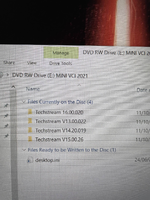
I’ve received the correct lead now and have downloaded the software. I’ve loaded the program via the Techstream Patch 32bit but I don’t appear to have the utility option that other people are showing on the screenshots, any idea?
IMG_4960.webp
 
For anyone else looking, I found this to be the best guide to getting Techstream working.

I ordered a cable via Aliexpress and struggled to get the software working. This guide suggests using a virtual machine, I used Oracle Virtualbox on a burner laptop to get a 32bit Windows 10 installation and it worked fairly easily after that. I don't know if there are any safer versions out there!
 
I did get mine working in the end, I tried it one last time before sending it back and for whatever reason the Utility option was there this time so I was able to change the settings I wanted. Very strange as I didn’t do anything different!
 
Air recirc and passenger door coded today thanks for this thread. Should be stickied with a summary of useful coding options on the OP.

I never figured out if manuals have auto dimming high beam, do they? Noticed the settings in there for it. Mine doesn't do it but I have the headlights on permanently rather than auto.
 
How is air recirc programmed as standard, and what change have you made?

Something to do with a temperature differential between the inside and outside of the car. Basically comes on all the time when I start the car and it annoys me especially if its wet and the car ends up steaming up.

Setting in tech stream i think was under the air con or climate section, was quite obvious anyway

Followed this post on GR86.org

Screenshot_20231008_201621_Chrome.webp
 
I have managed to disable the ESG. Also, the ‘Remote Control Key link Power Windows Support’ from the default ‘No Support’ to Support but, the windows do nothing when I press and hold the fob unlock button. Is the ‘support’ option the only thing I need to change?
 
That was the only change I made for it to work on mine.
Have you been back in and checked that it's stored? Not that there's any reason for it not to.
Yeah I did. Shows as ‘Supported’. Is it just a long press of the lock or unlock on the fob?
 
Yeah I did. Shows as ‘Supported’. Is it just a long press of the lock or unlock on the fob?
Yeah just push and hold lock for windows up, and the same with unlock for windows down.
It takes a couple of seconds maybe before anything happens, and it's not a 'one-touch' operation, the windows stop when you release the button.
 
Might be in my head but I think you also have to be fairly close to the car, closer than you have to be just to initiate the unlock.
 
I can never get the boot button on the keys to actually do anything, what am I missing?

Car locked press button, nothing. Car unlocked press button, nothing. Car unlocked door open press button, nothing. What am I doing wrong.

I know it’s not an automatic boot lift, but doesn’t even unlock for me, always have to press the button or the one in the car.
 
If I understand your question correctly, you want to unlock the boot with the key?
Have you tried holding the boot buttom on they key?
 
I can never get the boot button on the keys to actually do anything, what am I missing?

Have you've tried both keys? Sounds like you have an issue. You should hear the boot open, so you can lift it, as if you had pushed the button on the boot itself.
 
Back
Top