GR86 Techstream Help

paulR

Obsessed member
Joined
Jun 16, 2023
Messages
240
Reaction score
305
Location
Denmead, Hampshire
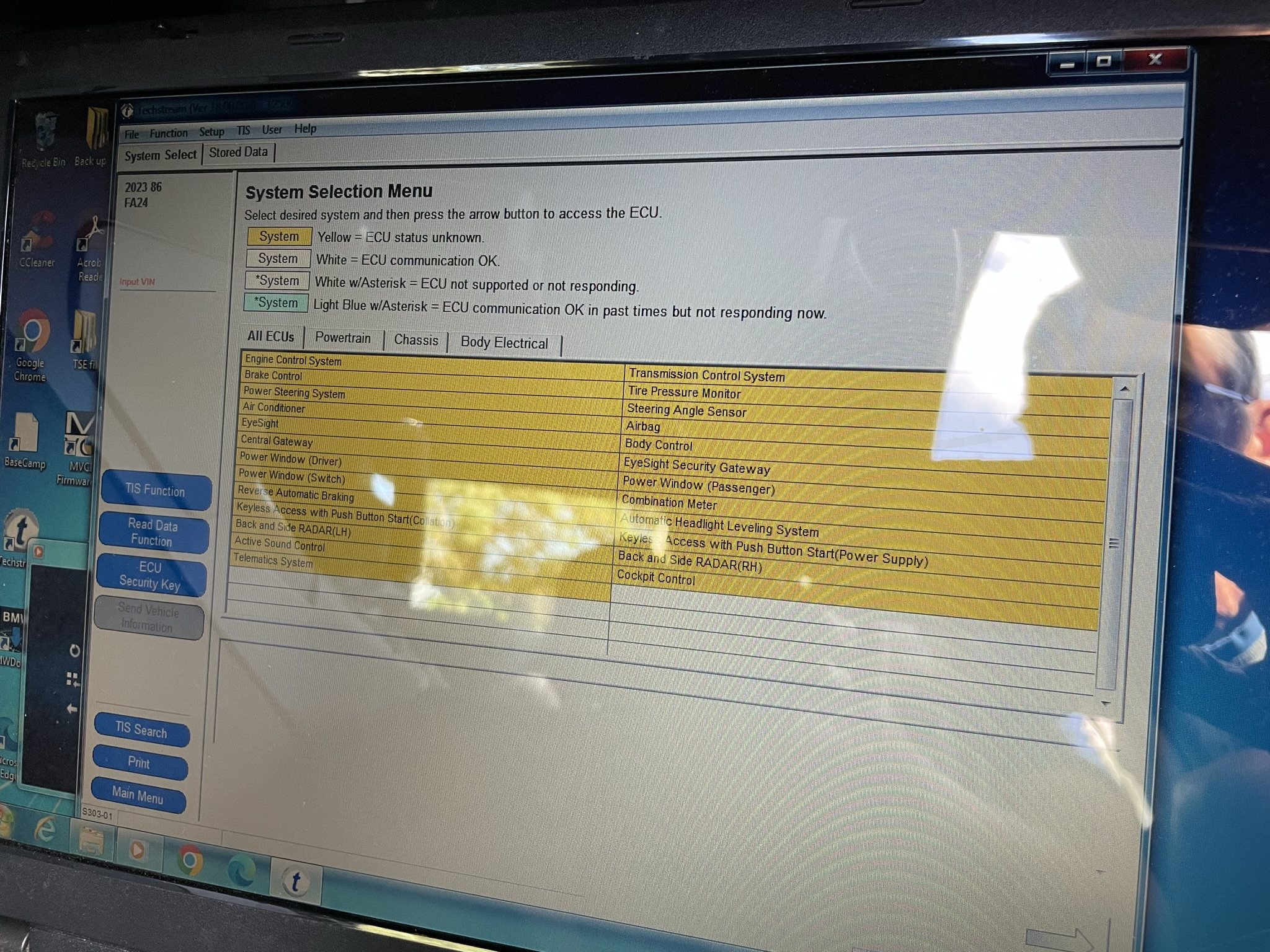
I’ve bought a miniVCI lead from Aliexpress and it came with Techstream software on a cd, version 18.00.008. The instruction video was on a Chinese (I think!) pc but I got the gist of it and downloaded the software and the driver. I’ve connected my laptop to the car and Techstream appears to be communicating ok but I don’t appear to have the yellow ‘Utility’ button to enable me to make changes, the screenshots I’ve seen on another thread all have this. Can anyone offer any help please? It’s quite an old laptop I’m using running Windows 7 (32 bit), anybody else have this set up?
Here’s a screenshot showing what I have…
F5C4FDD4-E558-44B3-BD1D-EA2936727C50.webp
 
@paulR Isn't it under 'Body Control' ? Try selecting that to find a sub-menu... I don't think the [Utility] button shows up until you are in an area that can execute changes?
Hopefully someone that's done it all before will show up here and give us the proper answer ... 🤞

EDIT: Have you checked out the Coding Thread HERE ?
 
Last edited:
@paulR Isn't it under 'Body Control' ? Try selecting that to find a sub-menu... I don't think the [Utility] button shows up until you are in an area that can execute changes?
Hopefully someone that's done it all before will show up here and give us the proper answer ... 🤞

EDIT: Have you checked out the Coding Thread HERE ?
Unfortunately not, I selected Body Control but still no Utility function.
Yes, I checked out that thread, thanks though 👍🏻
This is the screen after I’d selected Body Control…

IMG_4960.webp
 
I’ve bought a miniVCI lead from Aliexpress and it came with Techstream software on a cd, version 18.00.008. The instruction video was on a Chinese (I think!) pc but I got the gist of it and downloaded the software and the driver. I’ve connected my laptop to the car and Techstream appears to be communicating ok but I don’t appear to have the yellow ‘Utility’ button to enable me to make changes, the screenshots I’ve seen on another thread all have this. Can anyone offer any help please? It’s quite an old laptop I’m using running Windows 7 (32 bit), anybody else have this set up?
Here’s a screenshot showing what I have…

View attachment 20382
Did you license the software after installing it and then firewall block it from accessing the internet? I bought mine on ebay, and had to email the seller with a code to get the license key to then activate the software. The instructions I received also recommended blocking the application‘s access to the internet, presumably to prevent it from contacting ”home”.
 
Did you license the software after installing it and then firewall block it from accessing the internet? I bought mine on ebay, and had to email the seller with a code to get the license key to then activate the software. The instructions I received also recommended blocking the application‘s access to the internet, presumably to prevent it from contacting ”home”.
I wasn’t given a licence, the video instructions indicated I had to load the Techstream via a link called ‘Techstream Patch 32bit’, which I assume must somehow get around the licence key.
There didn’t seem to be a communication problem as the live data was showing the battery voltage which changed when I started the car.
 
Try double-click on a yellow entry you want to change. Techstream connects and then you should be able to use the lower lh button to change.

Bye for now Fred
 
I wasn’t given a licence, the video instructions indicated I had to load the Techstream via a link called ‘Techstream Patch 32bit’, which I assume must somehow get around the licence key.
There didn’t seem to be a communication problem as the live data was showing the battery voltage which changed when I started the car.
Ok, sounds like you had a different install process to me then. Have you tried emailing the seller to ask them about the missing functionality?
 
Ok, sounds like you had a different install process to me then. Have you tried emailing the seller to ask them about the missing functionality?
I did an online chat to them on Friday, I think it was just an admin person but she said she’d pass on my problem to the technical dept. I’ve not heard anything since.
 
The ony difference I can see is I installed the 64bit patch.
I've sent you the online link I used. The install video is slightly different to the cd version but it should be the same end result.
 
I wasn’t given a licence, the video instructions indicated I had to load the Techstream via a link called ‘Techstream Patch 32bit’, which I assume must somehow get around the licence key.
There didn’t seem to be a communication problem as the live data was showing the battery voltage which changed when I started the car.

No licence? That might be the problem.

When I got mine, I was given "instructions" to get the licence that gave me 5000 days (13+ years)

1694975775845.webp
 
When I got mine, I was given "instructions" to get the licence that gave me 5000 days (13+ years)
Same here. The installation process was a bit convoluted though, as the rar files were detected as infected with malware. It also required A/V software to be disabled as well as Internet Access to get a full install - one of the reasons I put it on a barebones laptop bought specifically to use with Techstream alone.
 
I’ll see what, if anything, the seller comes back with. It looks like I can read and clear DTCs which is handy even I can’t change any settings. The dealer has already changed the air con so the recirculation mode is manual, but they couldn’t work out how to change the fob settings for the doors and windows.
 
Has anyone had any success using a Windows 7 32bit laptop? I’m wondering if that’s my problem, although the seller advertises it as suitable for that operating system. I think this will be the last time I use AliExpress, the response from vendors on there is very hit or miss.
 
Back
Top
