
Hi guys since the old forum is a total mess i've decided to move to this one.
So my name is Evert i am from Belgium just outside of Brussels, i got my GR Yaris in October after trading in my GT86 and have been loving it ever since!
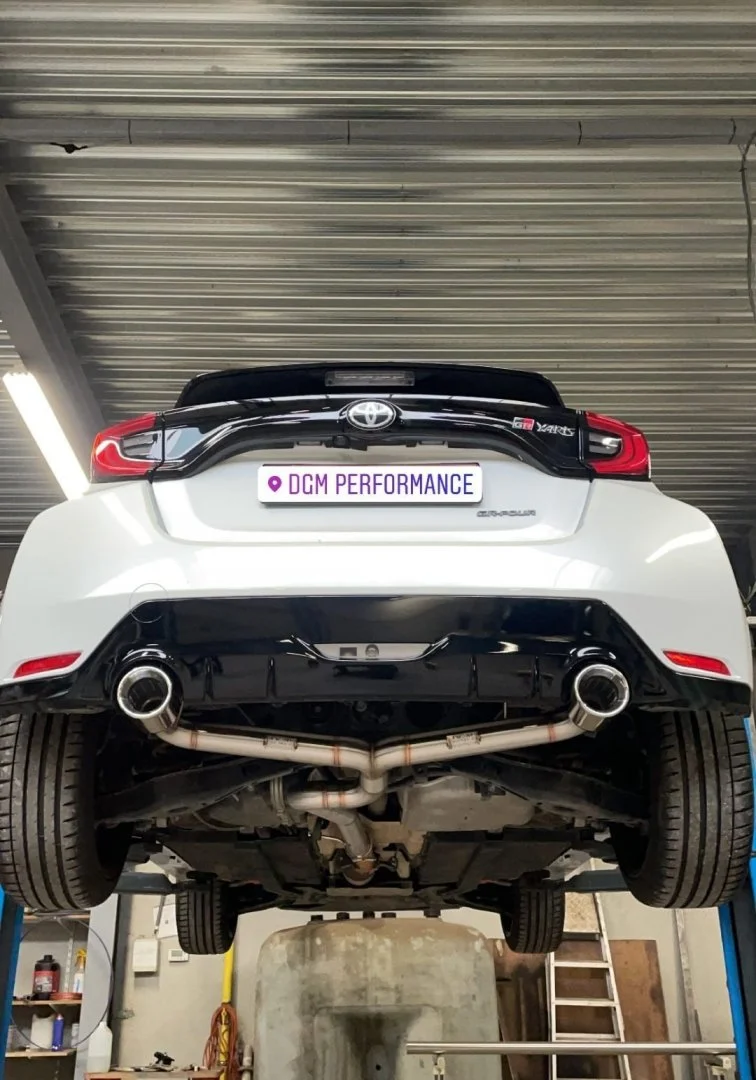
Since i got it i've got a custom exhaust made here in Belgium. (they claimed it's the first one in belgium with a fully custom exhaust instead of milltek or something else, could be but i don't know for sure)
After that the car got some H&R springs and today i finally fitted my wheels on it.
Rays TE37SL's 18x9.5 +35 with 255/35/18 Michelin Pilot Sport 4's
Up next for the modlist is The Stern Performance Rear Seat delete, Canchecked data display and some camber arms to put the camber around -2.5° all around, also an intake is on the list and a DTUK box.
Instagram: @shiroi_gr



So my name is Evert i am from Belgium just outside of Brussels, i got my GR Yaris in October after trading in my GT86 and have been loving it ever since!
Since i got it i've got a custom exhaust made here in Belgium. (they claimed it's the first one in belgium with a fully custom exhaust instead of milltek or something else, could be but i don't know for sure)
After that the car got some H&R springs and today i finally fitted my wheels on it.
Rays TE37SL's 18x9.5 +35 with 255/35/18 Michelin Pilot Sport 4's
Up next for the modlist is The Stern Performance Rear Seat delete, Canchecked data display and some camber arms to put the camber around -2.5° all around, also an intake is on the list and a DTUK box.
Instagram: @shiroi_gr


