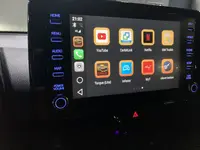
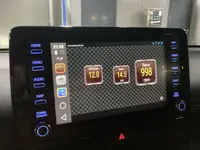
GR Yaris OBD2 info on the media display using Android Auto

MagnusT

Absorbed member
Joined
Dec 14, 2021
Messages
39
Reaction score
82
Location
Sweden
You can get torque pro on android auto with obd2aa.I have the app it’s pretty cheap.

The same guy sells android auto wireless adapter.

buy
xda thread


EDIT Dec 2021: There are some problems getting this to work at this very moment due to Google changing stuff in Android Auto. Hopefully solved soon


Huge thanks! Works great!


IMG_0342.webp
 
Yes I have to use a dedicated rooted phone which never has internet basically
So your phone charges via the 12v socket and then the Android auto is pushed wirelessly?

I'd love a wireless android auto, less cables!
 
How are you pushing Android Auto wireless to the car? Wasn't aware the GRY had wireless AA?

I can understand how you get the Torque Pro on your phone via OBD but not sure about WAA..
 
Only tried the Carlinkit stuff for Apple. Works well enough in my experience. There's a slight delay between command and reaction when scrolling through music. Assume it's the same for Android as likely some buffers filling in the background. Not a deal breaker in my opinion.

Semi related question: has anyone tried getting torque and a BT OBD dongle to work on one of these AA "AI" boxes? They do AA/Carplay but the main attraction is that they are more or less a screenless phone, complete with CPU and some sort of Android OS (usually 9, 10 or 11).
 
Only tried the Carlinkit stuff for Apple. Works well enough in my experience. There's a slight delay between command and reaction when scrolling through music. Assume it's the same for Android as likely some buffers filling in the background. Not a deal breaker in my opinion.

Semi related question: has anyone tried getting torque and a BT OBD dongle to work on one of these AA "AI" boxes? They do AA/Carplay but the main attraction is that they are more or less a screenless phone, complete with CPU and some sort of Android OS (usually 9, 10 or 11).
I believe @DeanoC connect his phone to his OBD and the OBD2AA and (somehow) displays TorquePro on his GR screen...still not sure of the details tbf.
 
EDIT Dec 2021: There are some problems getting this to work at this very moment due to Google changing stuff in Android Auto. Hopefully solved soon


Huge thanks! Works great!


View attachment 597

Hiya mate,

With this OBD2AA broken, are you using a rooted phone or a AA wireless USB adapter now?
 
No, search on Reddit, there is a how-to to install on unrooted phones.

AA Wireless work on both, rooted and unrooted.
 
  • Like
Reactions: Sly
Side note: I've ordered one of these "AI" Carplay adapters that is more or less an Android tablet without a display. In theory, this will show on the ICE screen without the Android Auto restrictions. So just a matter of getting Torque installed and the box connected to the OBD2 adapter.

Will update the thread once I have the thing and had a little play with it.
 
  • Love
Reactions: Sly
Side note: I've ordered one of these "AI" Carplay adapters that is more or less an Android tablet without a display. In theory, this will show on the ICE screen without the Android Auto restrictions. So just a matter of getting Torque installed and the box connected to the OBD2 adapter.

Will update the thread once I have the thing and had a little play with it.
Hi there. Every keen to know hoe you go with this. Please be sure top report back to us if it is a success :-)
 
Will certainly do, success or not. Still waiting for the Android box though. Should be coming from Poland so hopefully with me soon and not the usual Aliexpress order...

Edit: box finally here. But very little time to play. Effing work interfering with what is important in life :/.

Initial results: box is a nifty bit of kit for the price, decent speed and Torque installs and displays fine on screen. But big caveat: so far _not_ managed to get my OBD2 dongle (UCSI-2100,) to connect. Which makes the exercise kinda pointless. Will try with another BT dongle when I have a moment, hopefully this weekend.
 
Last edited:
OK, looks like it doesn't like the UCS dongle. Works OK with a boggo ELM 327 clone. Now to test a bit more and actually put something useful on the screen :).

IMG_8172.webpIMG_8173.webp
 
Yup, pretty much plug and play OBD dongle issue aside. Could be related to the UCS dongle having 2 BT profiles (one for Apple, one for everything else). Standard dumb ELM thing worked right away.

Couple of caveats:
+ have not done anything useful with Torque except setting it up
+ would not trust the OS on the AI box with sensitive data, best set up a dedicated Google account for it
+ the added functions are nice (nav without phone, Netflix & YT, wireless Carplay + AA) but work best with a dedicated data SIM
+ not sure how stable the thing is long term

Personally that was worth the €170 I paid, YMMW ;).

I picked it up from Xyingly [1] (8 core version from Polish warehouse because better for EU shipment). There's a neat thread [2] on XDA Developers that has other suppliers and a decent discount code for Xyngly.

[1] https://www.xyingly.com/products/qu...ta-volvo-wireless-connection?VariantsId=12283

[2] https://forum.xda-developers.com/t/...lcomm-rockchip-allwinner-android-7-9.4278289/
 
Back
Top