GR86 Brightness Dial?

grzoostuff

Totally Hooked
Joined
Apr 20, 2022
Messages
778
Reaction score
604
Location
UK North East
Hi All,
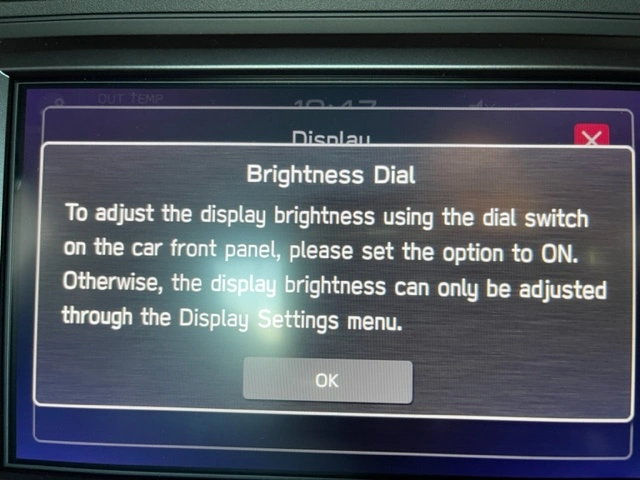
Has anyone got this function to work correctly? I had this set to brightness dial "on" but the screen was at maximum brightness in the dark and I couldn't find a way to adjust as it was too bright.
I've had to turn the function off and set the screen to default brightness.
Anyone worked this one out?

Not sure if our screens autodim as well?
IMG_4282.webp

Cheers.
 
Pretty sure when it's set to on, you then use the wheel thing to the right of the steering wheel which then changes the brightness of the head unit at the same time as the dials

Sent from my Pixel 6 Pro using Tapatalk
 
Couldn't' get it to work, using the right dial on mine (which is the volume) only adjusts the volume??
Do you mean on the console to the the right behind the steering wheel which has a brightness switch for the main speedo display?
 
Couldn't' get it to work, using the right dial on mine (which is the volume) only adjusts the volume??
Do you mean on the console to the the right behind the steering wheel which has a brightness switch for the main speedo display?
Yes, that brightness dial needs to be set to below maximum for the head unit brightness to be controllable via settings menu.
 
Yes, that brightness dial needs to be set to below maximum for the head unit brightness to be controllable via settings menu.
An odd quirk, and I only knew about it (prior to collecting mine) because of this forum!

I'm very grateful for all these jewels of information on here, thanks to everyone for sharing. Makes the first few weeks of ownership easier, without the universally-acknowledged weakness of having to (shudder) read the manual!
 
Yes, that brightness dial needs to be set to below maximum for the head unit brightness to be controllable via settings menu.
It appears to affect Android Auto too. If the headlights are on the AA maps are shown in night mode colours. But if the brightness dial is set to full, it overrides this and forces the map colours to day mode.
 
It appears to affect Android Auto too. If the headlights are on the AA maps are shown in night mode colours. But if the brightness dial is set to full, it overrides this and forces the map colours to day mode.
Yeah that was SUPER annoying on my first drive to work in the pitch black. Had to turn the whole thing off until I found that dial!
 
If you want to force night maps on the head unit instead of letting the headlight sensor dictate it, you can do it through the android auto settings on your phone.
1000017143.webp
 
It appears to affect Android Auto too. If the headlights are on the AA maps are shown in night mode colours. But if the brightness dial is set to full, it overrides this and forces the map colours to day mode.
After googling, this seems to be universal, or certainly on many cars. It took me a while to work out why maps was stuck in daytime mode on our Suzuki, despite being set to auto. Dropping down from max brightness on the dial fixed it.
 
Back
Top
